
Get Started
Learn how the Bima APIs fit together, from the first token to an issued policy.
Before you start
- API account: contact it@bima.om to get your API credentials.
- Environments: build against UAT (
https://uatapi.bima.om) and switch to production (https://api.bima.om) when you go live. See Conventions. - Request format: every call is
POSTwith a JSON body, and every response uses the same response envelope.
End-to-end flow
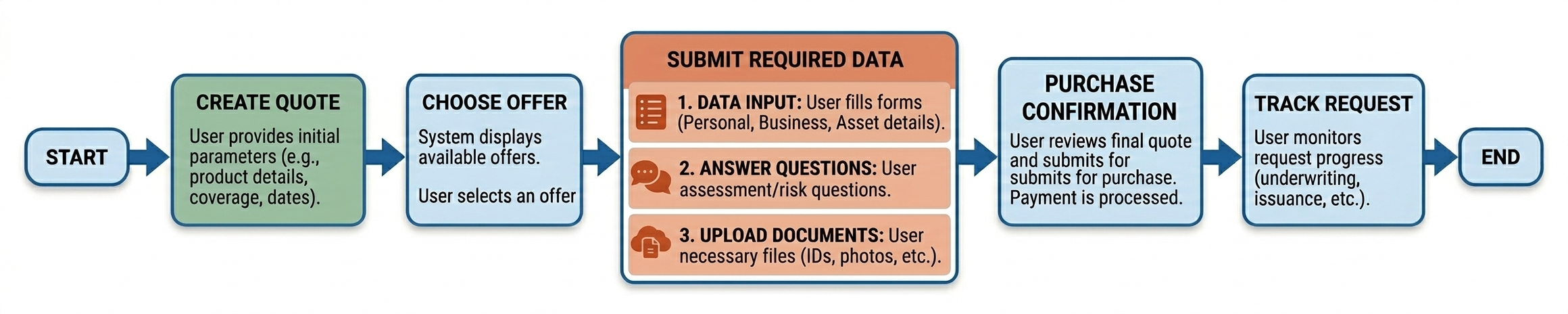
The complete process of purchasing any product is divided into the same nine steps. While the overall workflow remains the same for all products, the Create Quotation and Submit bodies vary based on the specific requirements of each product, and some products add a step before Submit.
-
1
Get a tokenRequest a bearer token and send it on every other call. Load the lookups you need (countries, nationalities, titles…) before building the quote.
-
2
Create the quotationSend the product's request (
request_type_code) with the customer and the subject insured. The body differs per product; the response gives thequotation_id.Edit a quote: call Create again with the changed data; a new quotation is created -
3
Read offers until QuotedPoll while the status is
AwaitingorProcessingand show offers as they arrive. Process regenerates all offers when needed. -
4
Add or remove optional covers Optional · repeat per changeSave the optional covers of one offer; the offer comes back priced again.
-
5
Customer picks an offerUse
insurance_type_codeto open the right details form. Read the offer's questions if it has any. Offers that need insurer approval go to follow-up instead of payment. -
6
Submit the chosen offerLock the offer and save the policy holder's details, answers and documents. The status becomes
Submitted.Before Submit (when documents are needed, e.g. Motor): Quotation/RequiredDocuments Before Submit (Travel): Quotation/UpdateInsurers -
7
Review the amount to payReturns only the chosen offer and the final payment amounts.
-
8
Finalize and open paymentFreeze the quote and send the customer to the payment page. Partners that collect payment themselves confirm the purchase instead.Own payment gateway: Quotation/Confirmation
-
9
Verify payment, issue policyConfirm the gateway result, issue the policy, then track the request to download the policy documents.
Key step
Optional step
Product-specific or alternative call
Choosing the next page after an offer is picked
After the customer picks an offer (step 5), use the quotation's insurance_type_code to decide which details form to show before Submit:
| Product | insurance_type_code | Before Submit |
|---|---|---|
| Motor | MOTOR_THIRD_PARTY MOTOR_COMPREHENSIVE |
Owner's name as on the Mulkiya and the required documents |
| Travel | TRAVEL_OUTBOUND TRAVEL_INBOUND |
Each traveller's name, passport and gender (UpdateInsurers) |
| Domestic, Home, Credit Life, Malpractice | See the product page | Product data, question answers and documents in the Submit body |
Detailed flow diagram including offer questions diagram
Quick start
- Authenticate: get a token and send it as
Authorization: Bearer <access_token>. - Load lookups: countries, nationalities, titles, genders and relations.
- Pick a product: follow its page to create and submit the quotation.
- Work with offers: read, re-price and choose an offer.
- Take payment: review, pay, verify and issue the policy.